
Built into Resolve Studio: Create Subtitles from Audio
- Open your edited timeline on the Edit page.
- Choose Timeline › AI Tools › Create Subtitles from Audio… In versions before Resolve 21 it sits directly in the Timeline menu.
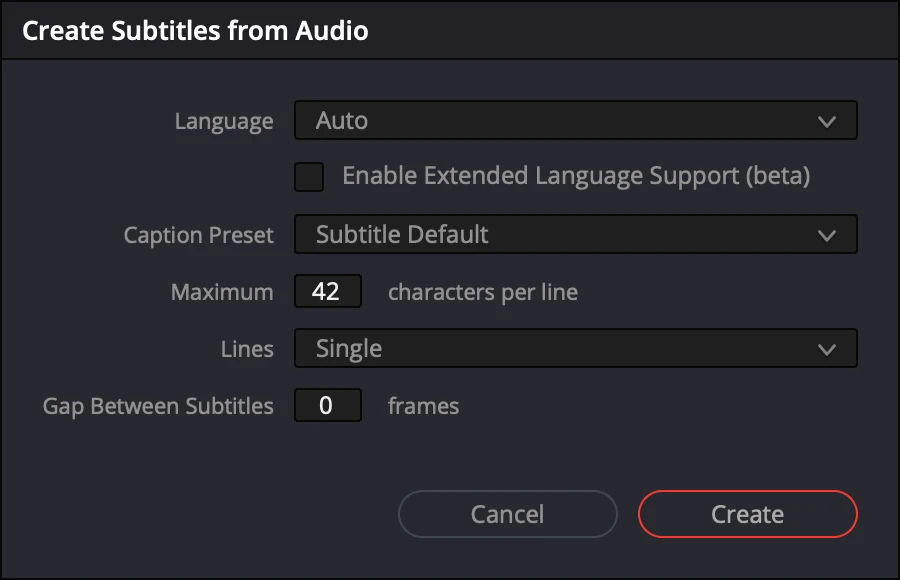
- Pick the language, the caption preset, the maximum characters per line, one or two lines and the gap between subtitles, then Create.
- Resolve transcribes the timeline and adds a Subtitle 1 track above your video tracks. Read it through and correct what it misheard.
It works well for a single speaker. On a podcast it transcribes the mixed sound, so it does not say who is talking, and crosstalk or quiet interjections are where it slips.
Subtitles for every voice, with SOLD CUT
SOLD CUT transcribes each person’s microphone, so every line knows who said it. What you get on a copy of your timeline:
- Short cues, about a second, two lines of up to 26 characters, timed word by word: easy to read on a phone.
- A cue that starts a few frames from a camera cut starts on the cut, so subtitles never flash across an edit.
- Every voice named, in 33 languages, on your Mac with Whisper large-v3 (free) or in the cloud with SOLD CUT credits.
- An optional AI review that reads the whole episode first, then fixes misheard words from context. Every change is shown and can be refused.
- Your studio look, copied from any timeline you already styled.
- Clips in another language, like a reel playing on the screen, subtitled in the episode’s language.
Already have subtitles on a timeline, from Resolve or another editor? SOLD CUT can use them as they are, at no cost, and build the YouTube titles from them.
What it costs
Transcription on your Mac is free. In the cloud, 1 credit is 1 minute of sound, and the AI review is 1 credit a minute; a 90-minute episode with everything is about 198 credits. Credits come in packs of 1,000 for €19 and never expire. SOLD CUT itself is €150 once for two Macs, with a 3-day free trial and 100 credits included.
Subtitles are one step of the podcast workflow: the multicam edit comes first, and SOLD CUT does both.
Questions
Does the free DaVinci Resolve create subtitles from audio?
No. Create Subtitles from Audio is a DaVinci Resolve Studio feature. SOLD CUT also needs Resolve Studio.
Which languages can SOLD CUT subtitle?
33 languages, from English, Romanian, Spanish, French and German to Japanese and Hindi, plus Auto-detect. We test English and Romanian in our own studio.
Does my audio leave my computer?
Not if you transcribe on your Mac with Whisper large-v3, which is free. Cloud transcription uploads only the microphones’ sound, deletes it after the job, and can be turned off in Settings. Video never leaves your Mac.
Can I keep my own subtitle style?
Yes. SOLD CUT copies the look of the subtitles from any timeline you already styled, or uses ours.